
The Update Configuration task helps you update multiple configuration item values for CygNet Measurement (FMS) Nodes all at once. The following steps describe how to accomplish mass configuration update tasks utilizing the Update Configuration task from the Device Data tool in the FMS Toolbox.
You must have proper security authorization to perform configuration record updates. FMS event authorization level 3 is required to complete this process. See FMS Security (and DEVCFG security event) for information about configuring security access for configuration data.
The following list provides an overview of the steps to update multiple configuration item values simultaneously.
Use the following procedure to perform multiple configuration updates.
To Update Multiple FMS Configuration Items
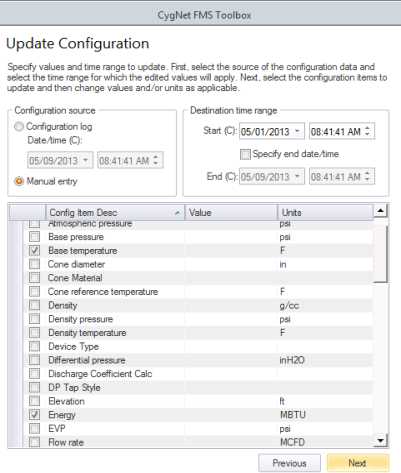
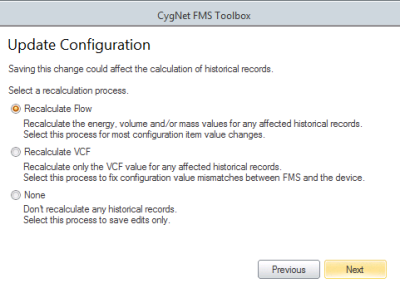


Set the following parameters to begin filtering Node results and make Node selections for your changes.
| Parameter | Description | |
|---|---|---|
|
Group |
Select a Node Group by group type, or by category. Options are as follows.
|
|
|
Node category |
Select a Node category. Options are as follows.
|
|
|
Filter |
Select a filter. First type a partial string of known Node name/description/ID characters to populate the filter text box in the control's Chooser. Wildcard values * (multiple character) and ? (single character) are supported. Default value is * (multiple character wildcard) - all. Note: Wildcards can be used only when filtering by Name or Desc, not when filtering by ID. Then select a Node option to filter for results. Options are as follows.
|
|
|
Retrieve Nodes |
Click Retrieve Nodes to apply the selected filters and retrieve the results. Results will appear in the Node list. |
|
You can sort the Node list results based on any of the following columns, to help with Node selection.
| Column | Description | |||||||||||||||
|---|---|---|---|---|---|---|---|---|---|---|---|---|---|---|---|---|
|
[Icon] |
Displays the icons indicating the Node type of the Nodes that meet the selected filters Node icons are as follows.
Click on the column header above the icons to sort the display (in ascending or descending order) based on Node type. |
|||||||||||||||
|
Node Name |
Lists the names of the Nodes that meet the selected filters Click on the column header to sort the display (in ascending or descending order) based on Node Name. |
|||||||||||||||
|
Node Desc |
Lists the descriptions of the Nodes that meet the selected filters Click on the column header to sort the display (in ascending or descending order) based on Node Desc. |
|
|
|


